
8 min read / Updated 2026-09-29
Prepared by the WireTorque catalog team
2021 Toyota Corolla Radio Wiring Diagram: Diagnose Reboots and Resets
A vehicle-specific diagnostic case file for a 2021 Toyota Corolla radio or display that restarts while driving, covering symptom capture, loaded power and ground checks, connector inspection, charging-system influence, and data-network testing order.
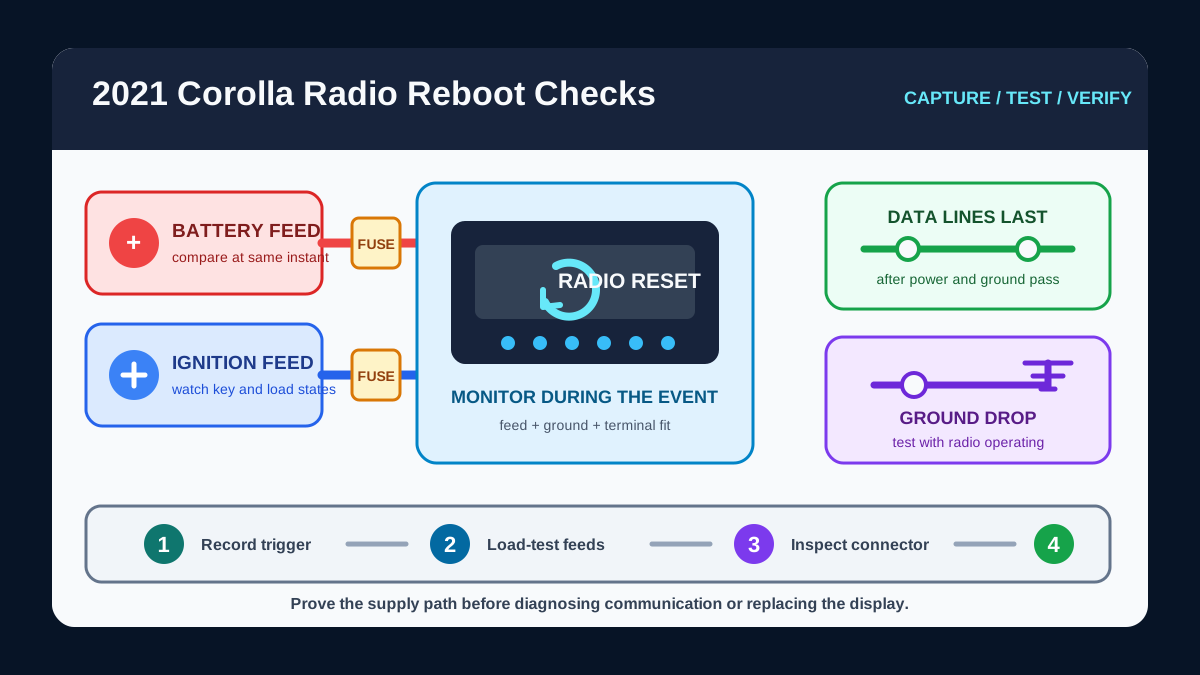
Capture the reset before disturbing the circuit
Separate a complete reboot from a screen that only goes dark, an audio dropout, a Bluetooth disconnect, or a camera display change. Record whether the clock and presets survive, whether warning chimes or steering-wheel controls also stop, and whether the fault follows a bump, engine start, high electrical load, heat, or recent battery work.
Those observations decide where to begin. A full restart points toward lost supply voltage, ground, or module operation. A working display with lost sound belongs to the amplifier and audio path. Several affected modules can point toward a shared feed, ground, charging event, or communication problem.
Match the equipped radio and navigation configuration
Confirm the exact receiver, display, navigation, amplifier, camera, and connected-service equipment before selecting connector cavities. The 2021 Corolla catalog contains separate Radio, Navigation, Power Distribution, Ground Distribution, and Computer Data Lines packages because one page may not show every branch involved in a reset.
Use the connector view and circuit name together. Do not identify a terminal by wire color alone, and do not force a meter probe into a connector. A spread or backed-out terminal can create the intermittent fault being investigated.
Monitor power and ground while the fault happens
Identify the constant battery feed, ignition or accessory feed, relevant fuses, and ground path from the exact diagrams. Back-probe safely with the circuit connected when the approved procedure permits, then monitor voltage during start-up, over bumps, and while switching loads such as the blower, rear defogger, and lamps.
Compare radio feed voltage with battery voltage at the same instant. A feed that falls while battery voltage remains stable indicates unwanted resistance or an opening upstream. On the ground side, measure from the radio ground terminal to battery negative while the radio is operating; voltage appearing across that path indicates resistance under load. Use the vehicle service limit when available rather than treating a no-load continuity beep as proof of a good ground.
Inspect connectors and charging behavior before the network
If the reset reacts to movement, inspect accessible connectors and harness support for loose locks, backed-out pins, poor terminal tension, moisture, heat discoloration, strained wiring, or previous accessory splices. Do not tug on small terminals or pierce insulation unless the repair method includes sealing the test point afterward.
If several electronics reset together, test battery connections and charging behavior while reproducing the symptom. A supply interruption, excessive ripple, or unstable system voltage can affect more than the radio. Confirm power and ground first so a voltage problem is not mistaken for a communication fault.
Move to data lines only after supplies are proven
When both feeds and the ground remain stable through the event, use the Computer Data Lines diagram to identify the radio or display communication branch and any gateway path. Scan all available modules before clearing codes, noting lost-communication faults and whether other modules report the same event time.
Do not apply battery power or ground to a data terminal, and do not assume every two-wire pair has the same resistance test procedure. Follow the vehicle-specific network test method. After a repair, repeat the original trigger, verify stable operation through several key cycles, and confirm that communication faults do not return.
Safety and test-tool precautions
Park securely, keep the transmission in Park, and keep test leads clear of pedals, steering components, fans, belts, and hot surfaces. Use fused test leads where appropriate and protect retained settings before disconnecting battery power.
Do not probe yellow SRS connectors, bridge unidentified terminals, substitute a larger fuse, or disconnect modules with the ignition on unless the approved procedure requires it. The diagram identifies the circuit; the service procedure supplies vehicle-specific disconnection, initialization, and safety steps.
Questions buyers ask
Why does a 2021 Toyota Corolla radio reboot while driving?
Possible circuit categories include an interrupted battery or accessory feed, excessive ground resistance, poor connector terminal fit, unstable system voltage, a communication fault, or an internal radio or display problem. Measure the circuit during the reset before replacing a module.
Should I test the CAN bus first when the display restarts?
Usually no. Prove the radio or display power feeds and ground under load first. A supply interruption can create communication codes and make a network problem appear more likely than it is.
Is a continuity test enough to confirm the radio ground?
No. A low-current continuity test can miss resistance that appears only while the unit operates. A voltage-drop test across the ground path under load is more informative.