
9 min read / Updated 2026-09-01
Prepared by the WireTorque catalog team
Car Radio Has Power but No Sound: Factory Amplifier and Speaker Wiring Checks
A practical no-sound diagnostic guide for factory radio systems covering amplifier enable, speaker outputs, CAN wake-up, radio fuses, ground paths, and connector pinout checks.
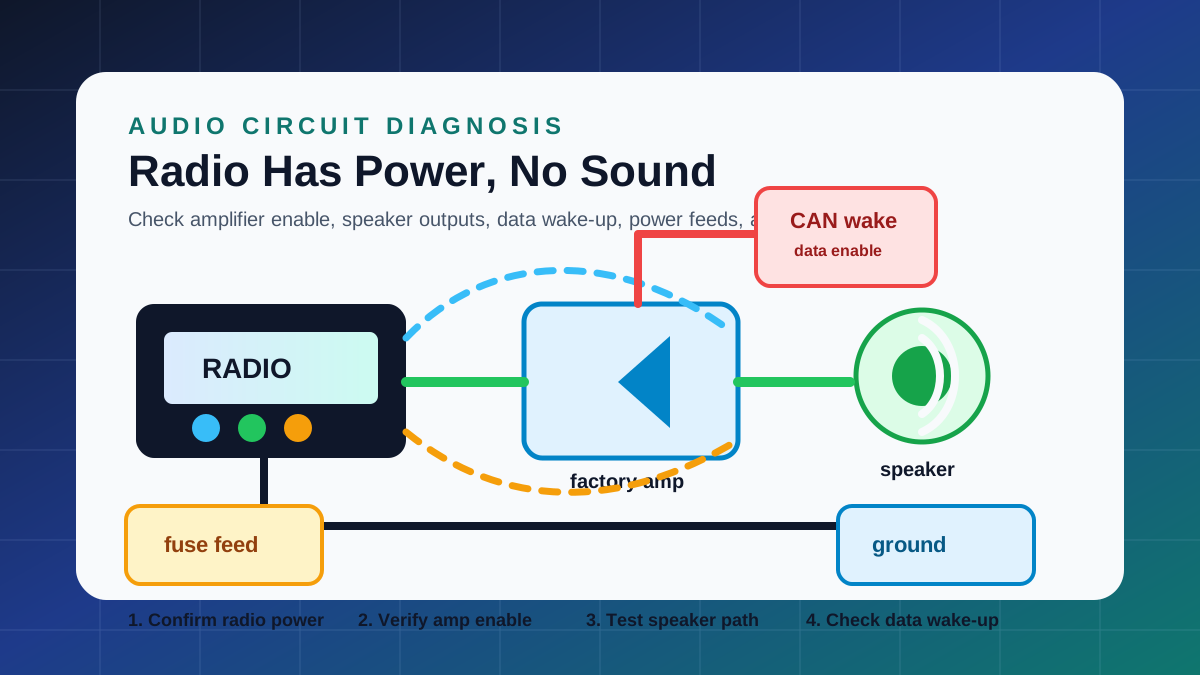
Confirm what still works before removing the radio
A radio display that turns on proves only part of the circuit. It does not prove the amplifier is awake, the speakers are connected, the audio signal is leaving the head unit, or the factory data network has enabled the system.
Start by checking whether the radio display works, whether volume responds, whether one speaker or all speakers are silent, whether navigation or warning chimes work, and whether the fault began after battery work, water intrusion, radio replacement, or collision repair.
Separate head unit power from amplifier power
Many factory audio systems use a separate amplifier. The radio may have correct battery feed and ignition feed while the amplifier has a blown fuse, missing ground, failed wake-up command, or damaged connector.
Use the wiring diagram to identify radio constant power, accessory or ignition power, ground, amplifier battery feed, amplifier remote turn-on or data wake-up, and shared ground points. Test the amplifier power path before replacing the radio.
Check amplifier enable and CAN wake-up
Older systems may use a simple amplifier remote wire. Newer systems can wake the amplifier over CAN, MOST, LIN, or another module communication path. In those systems, a basic aftermarket color chart will not be enough.
If the amplifier has power and ground but never wakes, compare the radio wiring diagram with computer data line diagrams. A missing data wake-up, gateway fault, or module communication issue can create a no-sound condition with a working display.
Test speaker circuits without damaging the amplifier
A shorted speaker wire, open speaker, water-damaged door connector, or incorrect aftermarket connection can mute one channel or trigger amplifier protection. The exact connector view helps identify each speaker positive and negative terminal.
Avoid applying voltage to unknown speaker or data wires. Use a safe test method, confirm impedance where appropriate, and inspect door-jamb harnesses and speaker connectors when only one door speaker is affected.
Use connector views for factory amplifier pinouts
Factory amplifier plugs often carry power, ground, input signals, speaker outputs, microphone circuits, camera or navigation signals, and data lines in one connector group. Wrong-pin testing can damage terminals or misdiagnose the system.
A connector view turns the radio wiring diagram into a usable test plan by showing pin location, wire color, circuit name, and the side of the connector being viewed.
Common causes after radio replacement
Aftermarket radio installation can leave the factory amplifier without turn-on, remove a required data interface, mix speaker polarity, or connect speaker outputs to an amplified input incorrectly.
If the issue began after installation, compare the factory wiring diagram with the adapter harness. Do not rely only on universal wire colors because factory audio systems vary by trim, amplifier option, navigation option, and model year.
When a full vehicle package is useful
Buy a radio system package when the complaint is limited to no sound, one speaker dead, amplifier not waking, or radio wiring identification. Choose a full vehicle package when the problem crosses navigation, body control, data lines, power distribution, or ground distribution.
Full packages help when the radio is affected by shared fuses, gateway communication, steering wheel controls, camera wiring, amplifier grounds, or previous repair work across multiple systems.
Questions buyers ask
Why does my car radio turn on but have no sound?
Common causes include missing amplifier power, missing amplifier enable, data wake-up failure, blown audio fuse, bad amplifier ground, shorted speaker wiring, or a factory amplifier fault.
Is a universal radio color chart enough for factory audio diagnosis?
Not usually. Factory amplified systems can use data wake-up, navigation modules, camera circuits, steering controls, and option-specific amplifier pinouts.
Can a bad speaker wire mute the whole audio system?
Yes. Some amplifiers enter protection when a speaker output is shorted or overloaded. The wiring diagram helps isolate the affected channel safely.
Do I need a CAN bus diagram for a radio problem?
Sometimes. If the amplifier or radio wake-up is controlled by data communication, the audio diagram and computer data line diagram should be checked together.